

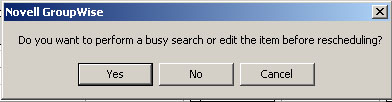
At last in Windows Vista we now have the Task Dialog to replace the MessageBox API so we can have all the nice little gimmicks that we have always yearned for. Like a checkbox that says "Only display this message once", the ability to have timed messages, or just to have sensible button captions so we no longer have to see popup messages like this:
Chances are that if you are maintaining a large project in any programming language
on Windows, you have already rolled out your own Message Box dialog replacement.
But now a full featured replacement has finally become part of
the Microsoft Style Guide for Windows Vista.
One of the great new features in the WTL 8 library is the
ability to dynamically construct dialogs.
You may not immediately recognize what you would use such a feature for
but try to imagine that you just downloaded the Visual Studio Express version
and panicked when you discovered that it did not come with a Resource Editor.
Of course you can download a free
Resource Editor
off the Internet, but when you panic you often learn something new and the
new CIndirectDialogImpl WTL class will help you there.
Or maybe you are a former C# developer and really liked the way
WinForms were constructed line by line. So now you want to construct your C++
dialogs the same way.
Now seriously, one use for dynamically constructed dialogs would be a dialog that
changes its appearance slightly each time it is launched. Slightly in such a way
that you would conceive it as one dialog, rather than trying to tie multiple
dialog resources to almost identical behaviour.
One such dialog is the Task Dialog in Windows Vista.
The problem with the Windows Vista Task Dialog is just that. It's a
Windows Vista-only component.
The control presented here is a remake of the Task Dialog.
It captures nearly all the functionality and works on platforms from Windows 98
and above.
It doesn't try to preserve the unique Vista theme visuals though, but instead
render its controls with the native look of the platform you're running on.
Nor does it use scores of custom painted controls to emulate all the
features of the Vista version. For some parts (such as the ability to embed
HTML links in the footer text) it just leaves them out when there is no
support on the platform it runs on.
Ultimately you may wish to combine this control with the AtlTaskDialog
function in WTL. You can call this to detect if the Task Dialog is
available on the running platform. If it's not, then fall back to the
Task98Dialog call.
Dynamic Dialogs
The dialog implementation is available in a separate C++ class calledCTask98DialogImpl. This is the class that does dynamic construction
of the dialog elements based on the passed Task Dialog configuration. Don't be
scared by the plentiful code, it does a number of checks to determine the
size of the window and how to best fit the controls.
The dialog passes through 2 phases to construct the dialog:
First it attempts to decide on the optimal dimensions of the dialog and then
it constructs the dialog with its controls.
Various types of controls are used to display the buttons, Command Links etc. on
the different platforms. Command Links are only supported on Vista so they must
be emulated in other versions of Windows.
The dialog is constructed in-memory using the WTL CIndirectDialogImpl class.
Using the accompanied macros in WTL to generate a dialog with fixed controls
or constructing a dialog where positions and sizes are known in advance, that is very easy.
However, if your dialog can have a more dynamic layout, like the Task Dialog, where buttons
and labels are shuffled around depending on some kind of configuration, you will need
to convert back and forth between the units system used by dialogs: Dialogs use
Dialog Base Units measurements rather than pixels. Dialog Units are a strange
beast as they are based on the average character pixel width and height of the font
attached to the dialog.
The idea is quite resourceful because it means that the dialog can scale properly
when you change system font. If you changed your display to use a high-DPI
resolution your dialogs should display perfectly too since the system font dimensions
are likely to change as well.
The native Vista Task Dialog shies away from using a traditional dialog. Instead it uses the now mythical DirectUser library, which is an internally developed - partially windowless - library used by Microsoft. I suspect it has some form of automatic layout algorithm like I experimented with in my windowless test project.
Using the control
To use this control, there are some new functions which mimic the API for the original Task Dialog component.Task98Dialog
Task98DialogIndirectTask98Dialog function takes a string type as defined by your
project settings (UNICODE or MBCS). This makes it slightly easier to
use in legacy applications.
The
Task98DialogIndirect function takes the same configuration
structure as the original Task Dialog function.
It also implements the callback functionality so you can override the
behaviour of the Task Dialog.
The Task98Dialog method is called like this:
int iRes = 0;
Task98Dialog(m_hWnd, _Module.GetResourceInstance(),
  "Window Title",
  "Main Instructions",
  "This is the message text.",
  TDCBF_OK_BUTTON | TDCBF_CANCEL_BUTTON,
MAKEINTRESOURCE(IDR_MAINFRAME), &iRes);MessageBox call.
To make use of all the Task Dialog's functionality you'll need to call the
Task98DialogIndirect method. Here's an example that adds
a verification checkbox and a couple of custom buttons.
TASKDIALOGCONFIG cfg = { 0 };
cfg.cbSize = sizeof(cfg);
cfg.hInstance = _Module.GetResourceInstance();
cfg.pszWindowTitle = L"Window Title";
cfg.pszMainIcon = MAKEINTRESOURCEW(IDR_MAINFRAME);
cfg.pszMainInstruction = L"Main Instructions";
cfg.pszContent = L"This is the message text.";
cfg.pszVerificationText = L"Verifcation text.";
cfg.dwCommonButtons = TDCBF_OK_BUTTON;
TASKDIALOG_BUTTON buttons[] = {
  { 100, L"Button #1" },
  { 101, L"Button #2\nText Below button." }
};
cfg.pButtons = buttons;
cfg.cButtons = 2;
cfg.nDefaultButton = 101;
int iRes, iRadio, iVerify;
Task98DialogIndirect(&cfg, &iRes, &iRadio, &iVerify);
If you really want to take control of the dialog, you can attach a callback
function and process notifications when something happens on the dialog.
For instance, when the dialog is constructed it will send the
TDN_CREATED notification, and if you enable a timer you'll
see the TDN_TIMER notification.
...
cfg.pfCallback = TaskDialogCallback;
cfg.dwFlags = TDF_SHOW_PROGRESS_BAR | TDF_CALLBACK_TIMER;
...

static HRESULT CALLBACK TaskDialogCallback(HWND hWnd,
  UINT msg, WPARAM wParam, LPARAM lParam, LONG_PTR lData)
{
  switch( msg ) {
  case TDN_TIMER:
    ::SendMessage(hWnd, TDM_SET_PROGRESS_BAR_POS, wParam / 30, 0L);
    if( wParam / 30 >= 100 ) {
       ::SendMessage(hWnd, TDM_CLICK_BUTTON, IDOK, 0L);
    }
    break;
  }
  return 0;
}TDF_CALLBACK_TIMER flag). When the Progress Bar reaches 100%
it will automatically press the OK button.
Finally, if you are more comfortable with using the WTL TaskDialog wrapper style of code, this is also possible. Here is a similar example, rewritten to use inheritance programming style:
class CMyTask98Dialog :
  public CTask98DialogImpl<CMyTask98Dialog>
{
public:
  int DoModal(HWND hWnd = NULL)
  {
    m_cfg.hwndParent = hWnd;
    m_cfg.pszWindowTitle = L"Window Title";
    m_cfg.pszMainIcon = MAKEINTRESOURCEW(IDR_MAINFRAME);
    m_cfg.pszMainInstruction = L"This is Progress Bar test";
    m_cfg.pszContent = L"This is the content text.";
    m_cfg.dwCommonButtons = TDCBF_OK_BUTTON | TDCBF_CANCEL_BUTTON;
    TASKDIALOG_BUTTON radios[] = {
      { 200, L"Radio #1" },
      { 201, L"Radio #2" },
      { 202, L"Radio #3" }
    };
    m_cfg.pRadioButtons = radios;
    m_cfg.cRadioButtons = 3;
    m_cfg.dwFlags = TDF_POSITION_RELATIVE_TO_WINDOW
      | TDF_SHOW_PROGRESS_BAR | TDF_CALLBACK_TIMER;
    return CTask98DialogImpl<CMyTask98Dialog>::DoModal(hWnd);
  }

  void OnCreated()
  {
    EnableButton(IDCANCEL, FALSE);
  }
  BOOL OnTimer(UINT wTime)
  {
    SetProgressBarPos(wTime / 30);
    return FALSE;
  }
};

...

LRESULT OnButtonPress(...)
{
  CMyTask98Dialog dlg;
  dlg.DoModal();
  return 0;
}
Ironically, you will need to define a few string resources and add a couple
of icons to your project before you can use this dynamically created dialog.
Have a look in the sample project attached below for more examples.
When specifying text for the popups, all the strings can be replaced with string
resource ID's, as in...
MAKEINTRESOURCEW(IDS_MSGBOX_TITLE)Notes
atldlgs.h code which occasionally prevents
large dialogs from being constructed. Please get the latest version
from the
SourceForge
download area or the latest files from the Subversion repository.Source Code Dependencies
Microsoft WTL 8.5 LibraryDownload Files
 | Source Code (60 KiB) |
