
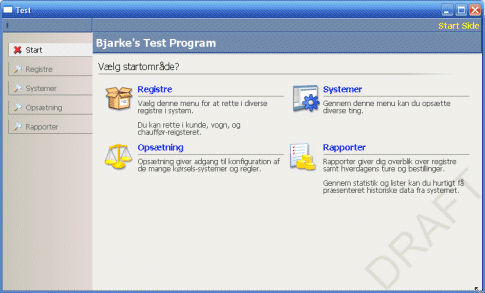
A windowless user-interface doesn't make use of the native Win32 controls. Instead it custom paints every control and widget on the screen - including labels, buttons, list control, etc. etc. Variations of this kind of interface is not new: "Skinning" has been widely accepted for its cool application-look, as seen in Nullsoft's WinAmp and the MS Media Player. But skinning is usually only feasible for small applications hosting a limited number of dialogs. If you're building a large database-driven application, you'll want to have a solid framework to back your dialog design up.
So I was looking at the Microsoft CRM application. In my opinion, this is one of the most successful DHTML interfaces I've seen (I should know because I've previously been assigned on a large browser-based CRM product). The MS CRM interface looks very Windows XP-like, but it also has several cool features, such as a navigation bar, a highly flexible list control and several shaded/gradient tool panels. I thought this would be a nice look to build for my windowless framework. I've previously tested a DHTML interface with this look, but wasn't satisfied - mostly because integrating a native app with the browser (IE) was painfully complicated.
 Even if constructing a windowless user-interface is a lot of hard work, it pays off in the end.
But you do need to implement your own dialog builder, button-design, keyboard interface and lots of little things you take for granted.
Actually it's not the painting of buttons and toolbars that take the most planning and effort; it's supporting keyboard shortcuts,
tab-navigation, automatic tooltips and a scalable design.
And then there are the mandatory - but often overlooked - features, such as list column-sorting, intuitive focus changes and
overflow scrolling that need to be addressed.
Even if constructing a windowless user-interface is a lot of hard work, it pays off in the end.
But you do need to implement your own dialog builder, button-design, keyboard interface and lots of little things you take for granted.
Actually it's not the painting of buttons and toolbars that take the most planning and effort; it's supporting keyboard shortcuts,
tab-navigation, automatic tooltips and a scalable design.
And then there are the mandatory - but often overlooked - features, such as list column-sorting, intuitive focus changes and
overflow scrolling that need to be addressed.
The design
My Direct UI user-interface takes bits and pieces from other UI models. Specifically it borrows ideas of the "controls-inside-controls" design from the Java AWT framework, XML dialog-resources from .NET, event-bubbling from HTML and C++ helper classes from MFC. The code doesn't actually use the WTL library like most of my other user interface samples on this website. It's pure Win32 calls.
One of the requirements for the framework was that it could be placed in an external DLL. This had a
nasty impact on the design, because C++ templates are not by any sane method exportable
in a DLL. So, a clean C++ old-skool (MFC) design is enforced,
with single inheritance and few (if not none) macros.
A window is built by nesting controls inside each other. Some controls are containers (such as the ToolBar, which
contains ToolButtons). To insert a ToolBar button, you simply construct a CToolButton C++ class
and add it to the CToolPanel control container. Most containers define layout algorithms such as the
vertical layout-panel, which arranges the contained elements below each other - a feature known from Java AWT.
Using a Java-like design, such as the layout containers, make sure that your controls will rescale automatically when
the window is resized. But anyone who has done any Java development knows how limiting its control layout features
are and has wished to kick the authors of the
GridBagLayout
class in the nuts. So there's also room for a dialog layout-panel, which allows you to put controls at a fixed position,
but with the option of scaling based on various stretching rules.
Constructing an entire window by hand in code is tedious, so there's a small XML parser included (extremely fast, extremely
non-compliant) which parses and builds a window from an XML string.
The framework caches all of its Win32 brushes and pens. Most of the GDI resources saved on window handles are
probably spent on this. But these kinds of objects are light-weight; it's the paint job that gets an incredible overhaul.
Native Win32 controls are used only for the EDIT control. This control contains so much functionality
that it would take ages to do a decent replacement. Single-line edit controls are created on the fly (when you click on the
frame) and multi-line edits are always visible. So the framework does have the ability to embed native Win32 controls
and even ActiveX controls, but at the expense of screen flickering and severe restrictions in the visual effects I'm planning.
Alluring text
The real benefits of this type of interface are the simple things. For instance, you can with one single swoop replace all occurences of Win32DrawText() with DrawPrettyHtmlFormattedText() - which
instantly gives you icons, customizable text-colors and clickable hyperlinks in the entire user-interface. With one single
line of code, you can now add HTML links in the statusbar panel.
Similar, you are not restricted to only put
CToolButton controls inside the ToolBar. Any kind of control
can be added. This also goes for the list control, which quickly can be made cool by adding some group-labels, or just
by adding clickable buttons or HTML links.
Since the individual controls rarely erase the background, most of them will actually fit
transparently inside the other container controls, so once you've made a neat widget it can be reused in the
entire user interface.
3D Animations
Another cool effect that can be easily added is the ability to do 3D rendering directly on the canvas. Just throw in some DirectX calls and you'll be able to write cool page transitions, highlight a control with some cool sparkling particle-effect or just put some glow effect on the edit-box with focus.You can also read about how I integrated DirectX into the application.
The sample
This may all sound very nice. However, the sample presented here is just the initial stage of a windowless framework I'll use for further testing. The library will need to mature a bit and go through a few rewrite cycles before I'll attempt to actually incorporate it in a real application. Still, it's pretty functional already. Enjoy.Wangchyz has a project on Google Code where's he's trying to extend the library, adding fixes and new samples.
The sample should be run with DirectX 9 installed and a modern 3D graphics card. Otherwise you will not be able to view the pretty 3D animations.
Source Code Dependencies
Microsoft Visual C++ 6.0Microsoft DirectX 9 SDK
Useful Links
An extended version: DuilibDownload Files
 | Demonstration (92 KiB) Source Code (127 KiB) |
