
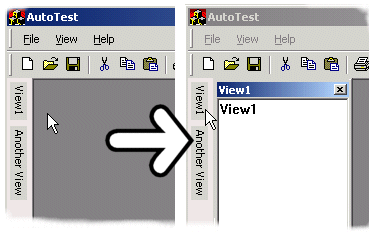
It sports a panel located on the left side of your application frame. When you click or hover above one of the text items, a new view window will slide out and allow you to click around. When the view window looses focus, it slides back.
I'm not really sure how useful a control like this is in a real application (erh, other than and IDE). It seems pretty annoying and there's no way of getting rid of that blasted sliding window effect. Well, use it if you like it...
To add the Auto Hide control to your frame window, add this...
CAutoHide m_autohide;
   LRESULT OnCreate(UINT /*uMsg*/, WPARAM /*wParam*/, LPARAM ...
   {
      ...
      CreateMDIClient();
      m_CmdBar.SetMDIClient(m_hWndMDIClient);

      m_hWndClient = m_autohide.Create(m_hWnd, rcDefault);
      m_autohide.SetClient(m_hWndMDIClient);
      ...
AddWindow() method.
      m_view1.Create(m_hWndClient, rcDefault, _T("View1"),
         WS_CHILD|WS_VISIBLE|WS_CLIPSIBLINGS|WS_CLIPCHILDREN,
         WS_EX_CLIENTEDGE);
      m_autohide.AddWindow(m_view1);
The Auto Hide panel, which hosts the views is currently a bit of a hack. It's a regular window with a resizing frame, but all edges except the one on the right are disabled and rendered grey.
The slide animation looks crap I think. Must be something to do with
the ::AnimateWindow() method.
Source Code Dependencies
Microsoft WTL 3.0 LibrarySee Also
Sample WTL applicationDownload Files
 | Source Code (12 KiB) |
