
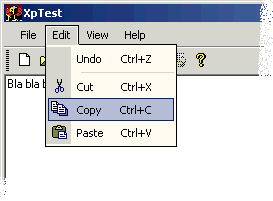
I don't actually have a Microsoft Office XP available, so I made it look like the VisualStudio.NET version instead.
So far the basic stuff is ready: Colorful menus, toolbar button painting, context menus, a thin menu frame, dropdown buttons, multipane statusbar, toolbars and a combobox control.
The control overrides the existing behaviour of the CCommandBarCtrl and other controls. All menu buttons, tool-buttons and other widgets are custom drawn.
How to use it
You simply use CCommandBarXPCtrl instead of the CCommandBarCtrl control class.After adding your regular toolbars to the rebar control, add them to the Command Bar and let it prepare everything...
  LRESULT OnCreate(UINT /*uMsg*/,
                   WPARAM /*wParam*/,
                   LPARAM /*lParam*/,
                   BOOL& /*bHandled*/)
  {
    ...
    CreateSimpleReBar(ATL_SIMPLE_REBAR_NOBORDER_STYLE);
    AddSimpleReBarBand(hWndCmdBar);
    AddSimpleReBarBand(hWndToolBar, NULL, TRUE);
    CreateSimpleStatusBar();

    m_CmdBar.AddToolbar(hWndToolBar);
    m_CmdBar.Prepare();
    ...
The sample also contains a ToolBar, StatusBar and a ComboBox control with the XP look. These controls are located in
atlctrlxp2.h and
need the atlctrlx.h and my atlgdix.h
header file to be included first to work.
Remember to add the
TBSTYLE_LIST window style when creating additional toolbars
if you need to add button text or dropdown buttons.
This sample demonstrates their use.
Source Code Dependencies
Internet Explorer 4 or betterMicrosoft WTL 3.1 Library
Download Files
 | Source Code (15 KiB) |
