
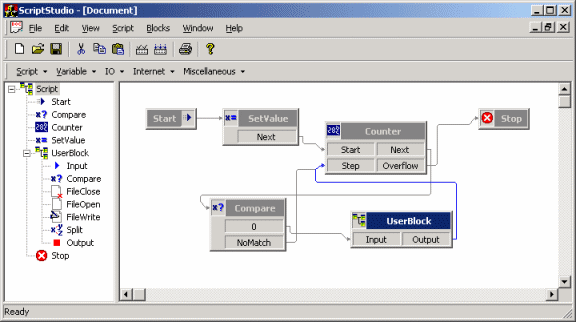
The Envox Studio is a cool application because it is highly scriptable... or should
I say: easily scriptable. What gives Envox a slight competitive advantage over other
IVR vendors is its cool 4GL scripting environment.
Each phone line can be scripted. A script is a sequence of actions that is executed
for each line. A typical script example could be: Wait for a phone call, look up phone number
in database, present voice menu if caller is known, if caller presses "1"
on the phone then send an e-mail to support account, hang up and go back to waiting for new call.
Building a script
Envox Studio uses a 4GL environment based entirely on drag'n'drop and GUI operations. You drag action blocks down to the script view. Each action block executes a simple command, such as "Assign value to Variable" or "Play .wav file".
Each script starts with a START block and ends with a STOP block.
You can drag additional blocks from the toolbar to the script view to create more actions.
Blocks are connected through links.
An action block has both input and output links. To connect two actions, you drag (with the mouse)
a link between an output box to an input box on the target block. These links determine the
sequence actions are executed in and by following the lines, you can read the entire script sequence.
Yes, you end up with something that looks very much like a good old Flow-chart diagram.
Each action block also has a Property Sheet, where you can configure the action's internal setup. For instance, the "Set Variable" block (which assigns values to variables) provides a list in its Property Pages, where you can define which variables that get which values. Likewise, in the "Play Menu" action's Property Pages you can browse which wave (sound) file to play when the action is executed, and so on.
The script doesn't support the concept of functions (not in the version of Envox I used, anyway) - it does however add a kind of sub-routines. The "User-Block" allows you to build sub-scripts. By double-clicking on a User-Block, you navigate into the sub-script and can refine actions in deeper and deeper script levels.
Consider the following script:
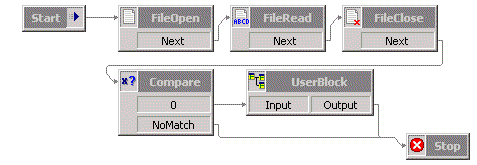
Cool, isn't it?
After dragging all your actions to the screen, you can compile the script. This produces the Runtime version, which is a binary representation of the code (or the code in a format that is translatable by the core application). During the compile phase, the script is also validated for errors, missing or unattached links, etc.
Of course you don't want to build huge scripts/applications in this language, but listing the feature set of the Envox Studio, you can't help to get excited.
- Variable operations (set, compare, split)
- Database operations (connect, sql, insert, update)
- XML support (load, iterate, modify)
- E-mail support (POP3, MAPI)
- FTP support
- TCP/IP (listen, connect, read, write, UDP)
- SMTP support
- HTTP (get, put)
- File support
- Native DLL (calling external functions)
- ActiveScript support (JScript/VBScript)
- MS Message Queue
- Speech Synthesis (SAPI, TTS, VoiceXML)
- Windows Registry
- Serial communication (COM, LPT)
- Windows DDE
- Various phone, VoIP, call-center related operations
There are lots of products that could benefit from adding scripting capabilities. Wouldn't it be nice to be able to add custom scripts to your router, firewall, ICQ or P2P client? The power of this type of scripting is that anyone can learn how to use it. Dragging boxes down on a window is simply something any non-programmer will be able to grasp - so once the concept of variables has settled in, anyone will be able to add their own scripts!
My sample
The sample presented here is an attempt to build a similar 4GL design environment. It's an experiment to see how difficult it would be to replicate a user-friendly drag'n'drop, click-this-click-that design user interface: To see if it's possible, with relatively little effort, to write up a GUI control that manages all the ickyness of drag'n'drop and comfy user interactions.
And that is excatly what this sample does. It implements a GUI control in the WTL
framework that draws the little boxes and arrows. The GUI control takes care
of displaying a view, where the user can drag and move boxes around.
The surrounding application must take care of building the view, adding boxes when
users drop them on the window, load and save models and navigate around inside the model.
The GUI control doesn't know of anything related to the model, runtime or even the
neat property pages that are displayed. It simply relays events and notifications to the
parent when something happens to one of the boxes.
So the sample demonstrates how a 4GL scripting environment could be built. It only implements parts of the UI functionality of the Envox Studio application. The version presented here is from the stage where the GUI controls were being tested and before the real runtime implementation was added. This means that it does not compile or validate an actual script or runtime code. In addition, no support for Property Pages or variables, search functions, logging and reporting has been added. It may seem a little odd because the missing functions are vital for a real development test, but the sample was built solely for the purpose of testing the GUI part.
Global Routing
Did you notice the neatly scattered links connecting the nodes in the script? Believe it or not, this was actually the most tricky part of the sample. I spent almost 3 days searching on Google™ to find a "human readable" explanation of how this could be done. There're tons of material/papers explaining this stuff and most of them are in incomprehensible math-language no mortal can understand. A lot of work is done in the field of Global Routing, since computer chip design depends heavily on these techniques. In the end I discarded most of the advanced equations babbeling about interactive orthogonal routing, and went back to basics...
What you see is an enhanced version of Lee's Algorithm. This is a common algorithm
used for finding the shortest path between two points given several obstacles.
The algorithm was modified to allow edge crossings and path sharing. Lee's algorithm finds
the shortest path between the points using a trick known as wave propagation and backtrace,
which actually is kind of a slow iterative process, but at least it's easy to understand
and visualize, and thus improve to fit your purpose. It was discovered way back in the 1960.
A good explanation of Lee's algorithm and global routing can be found
here, or this
Java Applet
for the dumb.
Code Features
- XML serialisation
- Routing using Lee's algorithm
- Advanced GUI control with many subtle features
Source Code Dependencies
Microsoft Visual C++ 6.0Microsoft WTL 7.1 Library
Download Files
 | Source Code and binary (189 KiB) |
