
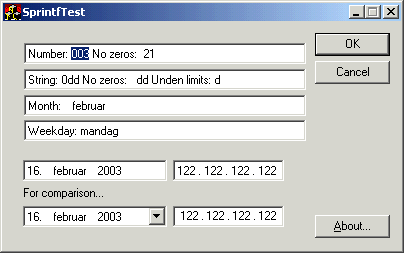
If you have ever worked with parsing text files, you have probably stumbled upon
the sprintf and sscanf C functions. They have neat and
often quite desirable formatting capabilities, so it's a pity we don't have anything
like it to put on the user interface.
When looking for a Windows control that would lend me some standard formatting,
the closest that comes to the mind is the Date Time Picker control.
The Date Time Picker control does allow some degree of customization,
but its far too difficult to cram out your own data types/behaviour of each
cell, so this new control does have its place. This new Scanf control can
simulate the DTP control, but also allows you to format your own cell types using
ordinary scanf formatting rules and even extend it with new types.
Now, many UI fanatics don't really like the Date Time Picker control at all, arguing that it does not follow the standard caret navigation or clipboard manipulation rules. This is true, and it does need a bit of "getting use to"-time before most users feel comfortable with its inner workings. Still, I agree that the cursor key navigation is controversial in a standard UI, but you'll just have to live with it.
Formatting
A format specification has the following form:%[-][#][0][width][.precision]type
Each field is a single character or a number signifying a particular format option. The type characters that appear after the last optional format field determine whether the associated argument is interpreted as a character, a string, or a number. The simplest format specification contains only the percent sign and a type character (for example, %s). The optional fields control other aspects of the formatting. Following are the optional and required fields and their meanings.
Pad the output with blanks or zeros to the right to fill the field width, justifying output to the left. If this field is omitted, the output is padded to the left, justifying it to the right.
#
Prefix hexadecimal values with 0x.
0
Pad the output value with zeros to fill the field width. If this field is omitted, the output value is padded with blank spaces.
width
Copy the specified minimum number of characters to the output buffer. The width field is a nonnegative integer.
precision
For numbers, copy the specified minimum number of digits to the output buffer.
type
Output the corresponding argument as a string, or a number. This field can be any of the following values.
- d - an integer
- s - a string
- y - year
- m - month name (integer based)
- w - weekday name (integer based)
Formatting
A few sample formats:%3d . %3d . %3d . %3d
An IP Address entry.
%02d. %m %y
A date entry that displays day, month and year.
Execute every: %w
Displays the weekday.
Using the control
To use it, place aSTATIC control (label) on your dialog. Make sure the rename
the resource from IDC_STATIC to e.g. IDC_EDIT1.
Add a member variable to your dialog implementation file...
CScanfEditCtrl m_ctlEdit1;OnInitDialog() event handler, add the following line:
  LRESULT OnInitDialog(UINT /*uMsg*/,
                       WPARAM /*wParam*/,
                       LPARAM /*lParam*/,
                       BOOL& /*bHandled*/)
  {
    ...
    m_ctlEdit1.SubclassWindow(GetDlgItem(IDC_EDIT1));
    ...
  }
The control gets its initial formatting string from the window text, however
you can use the SetFormat method to change it later on.
To retrieve the values from the cells, you have two choices:
Either you traverse the items (cells) and retrieve the item text.
This is easily done using the GetItemCount() and
GetItem() methods.
The other way to do it is using the (type unsafe) scanf member method.
  int ip1, ip2, ip3, ip4;
  m_ctrlIpAddress.scanf(TRUE, &ip1, &ip2, &ip3, &ip4);


  int day, month, year;
m_ctrlDateEdit.scanf(TRUE, &day, &month, &year);Likewise, use the
sprintf() method to set the control values.
Source Code Dependencies
Microsoft Visual C++ 6.0Microsoft WTL 3.1 Library
Download Files
 | Source Code (9 KiB) |
