
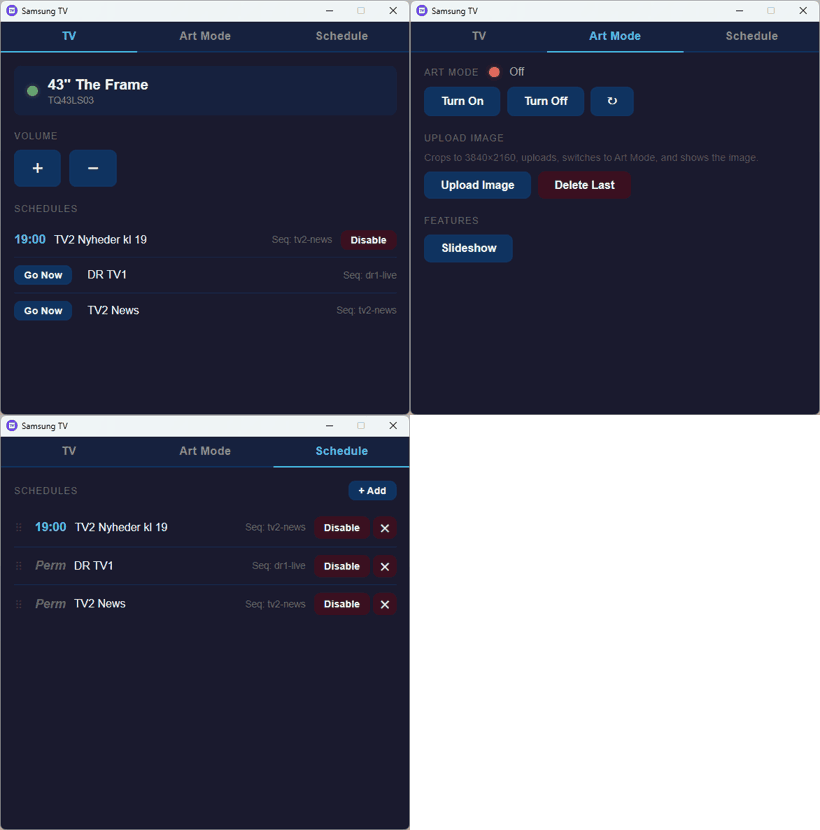
A small app to remotely control your Samsung "The Frame" TV from your Windows Desktop.
The Samsung "The Frame" TV is especially designed to view art images while the TV is not in use. However, Samsung recently decided to make it difficult to view art unless you bought an additional subscription. This little app tries to make uploading images to your Samsung TV simple again.
So the primary goals of this app are:
- Make uploading your own art images easy.
- Set the TV in Art Mode
- Schedule a TV programme / app to switch to at a designated time.
(think: Watch News at 19:00 every night). - UI buttons to easily navigate into TV apps using sequences of remote control key-presses.
This should work with newer Samsung Art Frame TVs (2022+). Older models may not respond at all.
This was largely vibe-coded by Anthropic AI.
Features
TV Features:
- TV discovery (online test, TV + brand name display).
- Volume Up/Down control.
- Schedule to watch a program later.
- Buttons to go directly into any TV app using key-press sequence.
- Wake-on-LAN feature
Art Mode Features:
- Start Art Mode.
- Start running as Slideshow.
- Upload JPEG images with various crop/scale options.
- Prevent Art Mode turning off while running.
Building the tool
Just get the prebuilt version for Windows. Or...
Prerequisites are Bun.js, ffmpeg and Visual Studio Build Tools (with the C++ workload) installed.
- To build the DLLs and EXE file, first run
a_set_env.cmdwhich starts a shell initialized with the Microsoft Visual Studio SDK Kit.
You may need to edit this file first to match your SDK installation. - Then use
run-build-dll-exe.cmdto build DLLs and EXE files. - Use
run-dev.cmdto run in development mode with prebuilt DLLs. - Use
run-prod.cmdto launch the final executable (after running build).
It basically just runs theSamsungTvApp.exeexecutable.
This is using Bun.js for backend, and a custom MS WebView2 wrapper for UI.
You will need to manually edit key-press sequences for your preferred TV programme / app.
These lists are found in the ./data folder.
Keeping Art Mode alive on the TV might require you to disable the Motion Sensor timer.
What is NOT working yet
- Listing and launching specific TV apps by ID doesn't work on my TV.
This is a known problem with newer Samsung TV firmware. Use Sequences feature instead.
Notes
This is not a product made by Samsung.
AI Usage
Source Code Dependencies
Bun.js 1.3FFmpeg
Download Files
 | Source Code (246 KiB) |
