
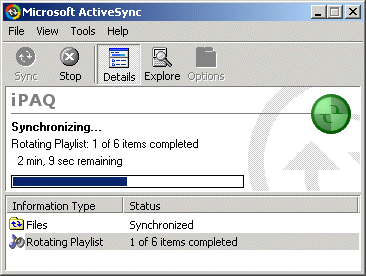
Do you use your Pocket PC as an MP3 player?
Then this ActiveSync extension might be for you. The Playlist Sync extension for Pocket PC 2003 copy MP3 and playlist files to your Pocket PC at scheduled points in time - always keeping your PDA updated with new music.
Playlist Sync will activate while your PDA is in the cradle and copy MP3 files from your Desktop PC to the device. You can configure when it should copy files and how much data should be transferred.
Because copying large amounts of data to the PDA through your ActiveSync connection could take a considerable time, you may wish to adjust the settings so files are only copied during your lunch-break hours or while you're asleep.
Though not required, it doesn't really make sense to copy large amounts of MP3
files to your PDA main memory, a memory expansion card should be used.
If your MP3 files are spread over several directories on your Desktop PC, you
just need to point Playlist Sync to the folder, where your
Winamp
playlists are located. Playlist Sync has support for the following playlist
sources:
- m3u - Winamp 2
- b4s - Winamp 3
- asx - Windows Media Player
- wpl - Windows Media Player 9
- pls - Shoutcast / Icecast
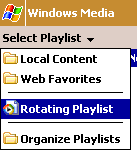
| Once new files have been copied to the PDA, a "Windows Media Player for Pocket PC" playlist is generated and activated on the PDA. This means that all you need to do to listen to the new music, is to open the Windows Media Player and hit the "Playlist" menu-button, then select the "Rotating Playlist" item from the menu in the top. From now on your music list will always be up to date. |
 |
Installation
Click on the link below and download the setup program.While installing, the CE Application Manager will prompt you to install the device files. At this point have your Pocket PC device in the cradle and connected with ActiveSync. Press the OK button to install the files.
Once installed, open the ActiveSync window (double-click on the icon in the taskbar if it is hidden). If you do not already see the "Rotating Playlist" item in the list, open the "Tools / Options" menu in the ActiveSync window and find the "Rotating Playlist" item in the list and enable it. Press the OK button to leave.

Let ActiveSync do its synchronization thing once more and right-click on the
"Rotating Playlist" item. Pick the "Settings" menu-item and configure
the extension.
Make sure to specify a suitable "Source Folder". Then go to the second tab-folder and specify a "Target Folder", preferably on a memory expansion card.
Acknowledgments
Sean P. Finn for giving me the idea.Installation Requirements
Pocket PC 2003Microsoft ActiveSync 3.7
Download Files 
 | PlaylistSync Setup (135 KiB) |
