
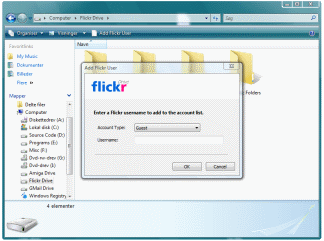
This virtual folder works in Windows Vista or better.
Once installed, you can access the My Computer folder from the Windows Explorer
or through the icon in the All Programs list in Windows 7.
One of the more popular web-services today is the Flickr photo service, which allows you to store photos on the Internet. The Flickr Drive tool allows you to browse and edit your online photos as if they were located on your own hard-drive. Use features such as drag'n'drop to add photos to your online Flickr photosets. Manage your photos by editing tag properties directly in Windows Explorer.
Browse photos from other Flickr users by adding accounts to the root of the Flickr Drive folder. Search for photos with specific tags by adding a Tag Search folder (similar to a regular search folder in Windows Vista). Under your own Flickr account, you can add and delete photos and photosets too.
When you browse a photoset folder, make sure to toggle the thumbnail view in Windows Vista so you can see the photo previews. Flickr Drive uses the Flickr API over the Internet to browse files so downloading images and previews may be slow depending on your Internet connection.
This product uses the Flickr API but is not endorsed or certified by Flickr. Note that while this application utilizes user authentication provided by Flickr, no information about specific users is collected, used, stored, or disclosed to anyone associated directly or indirectly with Flickr Drive, nor with any third parties (including advertisers). You are as safe using Flickr Drive as if you were using the Flickr website.
The Source Code
The source code for Flickr Drive is available, so if you are a programmer with interest in extending the Windows Shell you might learn from it.This is the 3rd and last sample that demonstrates a set of generic Shell Namespace Extension C++ classes I wrote. The previous samples, the Registry Extension and the TAR Folder, have basic functionality, while this Flickr Drive sample demonstrates a full virtual drive that connects with external storage.
Shell Extensions are plug-ins for Windows Explorer and allow you to expand the namespace
hierarchy that Explorer presents users with. Virtual items can exist in the hierarchy
alongside regular file-system objects. The Recycle Bin in Windows is a good example of this.
The ability to browse into a compressed ZIP file in Windows Vista and manipulate the
virtual files inside the ZIP structure is another prime example.
Before you decide on creating a Shell Extension for a project, you should realize
that Shell Extensions are rarely the right technology for the job. First of all, the
documentation for these things are kept obscure and to a minimum by Microsoft - at least
until yet another anti-trust lawsuit threatens Microsoft to put out some more scarce
documentation.
You should consider using other technologies for that very reason. Use a Windows
Service to synchronize files to the file-system in the background, or create a
network file-system (CIFS)
to be able to have a mapped drive-letter, extend a
user-mode file-system driver,
perhaps a free one,
or go on an adventure and create your own low-level
file-system device driver.
If that sounds like a bit too much work, Windows 7 offers a
Search Connector technology
that might prove interesting too.
You need only create a Shell Extension if you wish to customize the actual user-interface that Windows Explorer is presenting to the user. In case of the Flickr Drive, a couple of new toolbar buttons allow the user to attach new Flickr accounts, and right-click menus allow the user to add photos to the Favourites folder etc.
Source Code Dependencies
Windows VistaMicrosoft Visual Studio.NET 2008
Microsoft ATL Library
See Also
A Shell Extension in the My Computer folderA Shell Extension that extends a file-extension
Download Files 
 | Installation file (352 KiB) Source Code (349 KiB) |
