

GMail Drive shell extension
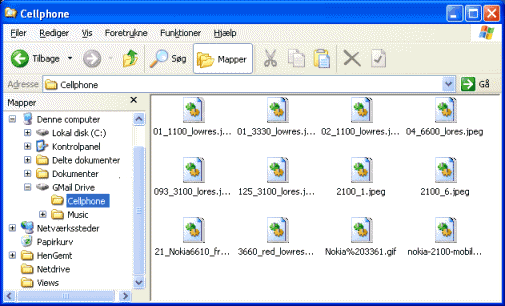
GMail Drive creates a virtual filesystem on top of your Google Gmail account and
enables you to save and retrieve files stored on your Gmail account directly from inside
Windows Explorer.
GMail Drive literally adds a new drive to your computer under the My Computer
folder, where you can create new folders, copy and drag'n'drop files to.
Ever since Google started to offer
users a Gmail
e-mail account, which includes storage space of 15000 megabytes, you have had plenty of
storage space but not a lot to fill it up with. With GMail Drive you can
easily copy files to your Google Mail Account and retrieve them again.
When you create a new file using GMail Drive, it generates an e-mail and
posts it to your account. The e-mail appears in your normal Inbox folder,
and the file is attached as an e-mail attachment. GMail Drive periodically
checks your mail account (using the Gmail search function) to see if new files
have arrived and to rebuild the directory structures.
But basically GMail Drive acts as any other hard-drive installed on your
computer.
You can copy files to and from the GMail Drive folder simply by using
drag'n'drop like you're used to with the normal Explorer folders.
Because the Gmail files will clutter up your Inbox folder, you may wish
to create a filter in Gmail to automatically move the files (prefixed
with the GMAILFS letters in the subject) to your archived mail folder.
Please note that GMail Drive is still an experimental tool. There's still a
number of limitations of the file-system (such as total filename size must
be less than 65 characters). Since the tool hooks up with the free Gmail
Service provided by Google, changes in the Gmail system may break the
tool's ability to function. I cannot guarantee that files stored in this
manner will be accessible in the future.
|
The tool is no longer supported
After a great 10 years of service, this tool is no longer supported.
Let me give you a history recap: GMail Drive was based on the idea of a remote drive tool on Linux by Richard Jones, and immediately made headlines in 2004. It had millions of downloads, included on IT magazine CD-ROM distributions all around the world, even had coverage in a few newspaper articles, such as the New York Times, and was enjoyed by lots and lots of users. Just a few months after its initial release, a secret document from Google was leaked hinting work on a product supposedly called G-drive. It never came to light, stopped by Google's top brass, probably to their dismay now because Microsoft would scramble to get their SkyDrive (now OneDrive) ready. Today, anyone who wants to be in the Cloud business, needs to have reliable cloud storage solution to offer to their customers.
The GMail Drive tool is dead. But don't despair. Lots of other remote storage options exist now, and many of them are available for a fairly low price. And they won't store your files inside clunky e-mails either.
Installation Requirements
Internet Explorer 5 or betterInstallation Guide
- Extract the ZIP file to a temporary folder.
- Run the Setup application.
Useful Links
Original idea by Richard JonesDownload Files 
GMail Drive - no longer available
Article submitted 10/4/2004.
