
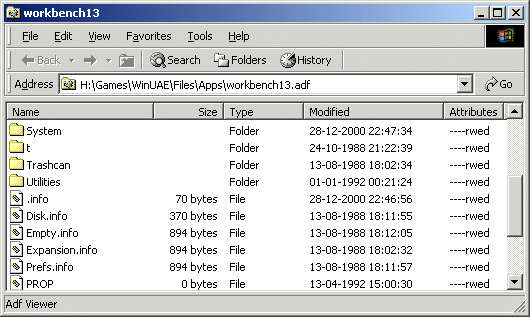
Because ADF View is a namespace extension, it is integrated right into the Windows Explorer. Double-clicking on an ADF file brings up the familiar folder view, where you can copy, move, delete, recover and rename files, as you would usually do with normal PC files. You can also drag'n'drop files from any Windows folder to an ADF folder, and back.
ADF View works with Amiga floppy images and hard disk images. It even detects real Amiga hard drives attached to your computer and adds a new drive icon to the "My Computer" folder under Windows NT/2000/XP/Vista/Win7.
New and empty disk images can be created using a Wizard under the Shell New commands (The File/New sub-menu in the Windows Explorer).
You can download ADF View here.
The Source Code
The source code for ADF View can be freely downloaded.It can serve as a general example on how to implement a rooted, multi-level namespace extension with complete support for toolbars, menus, drag'n'drop, copy/cut/paste and other file operations. It is implemented using the Microsoft ATL library to hide the grungy details of COM programming.
ADF View uses the ADFlib from Laurent Clévy to access the Amiga file-system. This library is designed to manage Amiga formatted devices and dump files in the AmigaDOS format.
If you're having trouble getting your native Amiga harddrive connected with ADF View, download this little utility. By using it you should be able to tell why ADF View does not detect your drive. Be sure to read the notes in the help file.
License Terms
 Because ADF View uses a 3rd party library, ADFlib,
it is available under the
GPL
license.
Because ADF View uses a 3rd party library, ADFlib,
it is available under the
GPL
license.
Source Code Dependencies
Internet Explorer 5 or betterMicrosoft Visual C++ 6.0
Microsoft ATL Library
ADFlib
Installation Guide
- Extract the ZIP file to a temporary folder.
- Run the Setup application.
Useful Links
ADFlibWinUAE - a cool Amiga Emulator
Some of my own Amiga code and more links
Download Files 
 | Installation files (307 Kb) Source Code (431 Kb) |
